USA | UltraSn0w.ru Skip to content

UltraSn0w.ru

iPhone 3G/3GS Unlock Software

Archive

Tag: USA

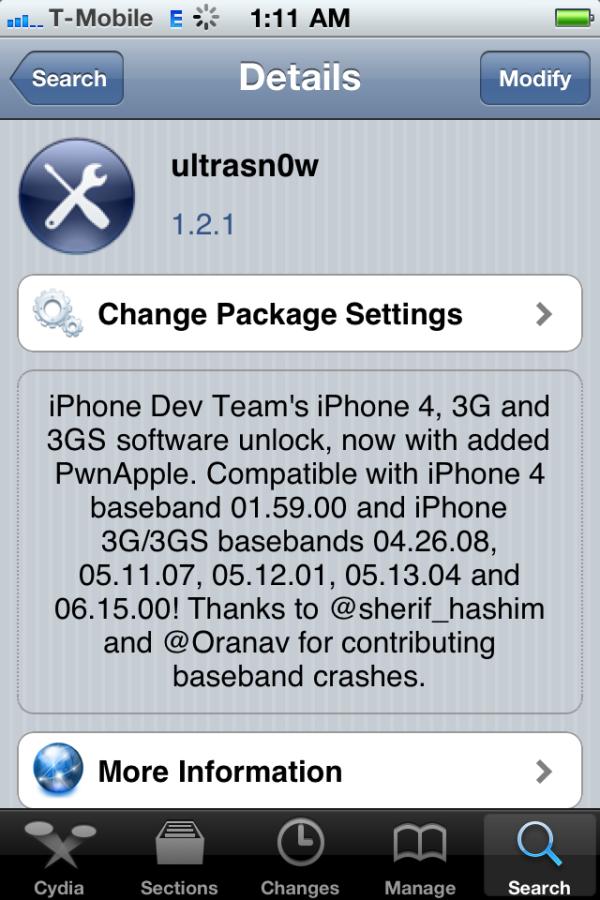
ultrasn0w-121

The iPhone Dev-Team released an update to UltraSn0w that makes it compatible with iOS 4.3.1 for basebands previously unlocked. You can use ultrasn0w if you need carrier unlock and you have compatible baseband, preserved with pwnagetool, sn0wbreeze or tinyumbrella.

Ultrasn0w 1.2.1 supports only the following basebands:

  • iPhone 4: 01.59.00
  • iPhone 3G/3GS: 04.26.08, 05.11.07, 05.12.01, 05.13.04, 06.15.00.

You can install ultrasn0w via Cydia.

Here are DevTeam comments:


Read the rest of this entry »

You cannot use JailBreakMe method to jailbreak and unlock iOS 4.0.2 on iPhone 3G. However you can still jailbreak and unlock iPhone 3G using redsn0w. Here are the instructions:

  • Download the latest RedSn0w 0.9.5-b5 in our utilities page here.
  • Download firmware images for iOS 4.0 here.
  • Run RedSn0w and point it at the 4.0 IPSW. (Yes – point it at the 4.0 IPSW even though you’re at 4.0.2). This will also hacktivate your iPhone3G at 4.0.1 if you haven’t already been activated by iTunes.
  • If you need a carrier unlock – install ultrasn0w in Cydia (add repository http://repo666.ultrasn0w.com). For T-Mobile in the USA remember to turn off 3G mode in Settings→General→Network.

There is no official jailbreak utility for iOS 4.0.1. However you can still jailbreak and unlock iPhone 3G. Just do the following:

  • Download the latest RedSn0w 0.9.5-b5 in our utilities page here.
  • Download firmware images for iOS 4.0 here.
  • Run RedSn0w and point it at the 4.0 IPSW. (Yes – point it at the 4.0 IPSW even though you’re at 4.0.1). This will also hacktivate your iPhone3G at 4.0.1 if you haven’t already been activated by iTunes.
  • Install ultrasn0w in Cydia (add repository http://repo666.ultrasn0w.com) if you need a carrier unlock (and in the USA, remember to turn off 3G mode in Settings→General→Network).

Good news from DevTeam. They just announced via twitter that unlock for firmwares 3.1.3 and 4.0 is ready:

RT @MuscleNerd: ultrasn0w tips: 1) Works for all basebands since 3.0 FW 2) Remember to disable 3G on T-Mobile USA

ultrasn0w 0.93 released! Cydia repo is repo666.ultrasn0w.com. Works with basebands 04.26.08 thru 05.13.04

This means, that all users with basebands 04.26.08, 05.11.07, 05.12.01 and 05.13.04 can use ultrasn0w 0.93.

There is no jailbreak for just released iOS4, so you need to wait a bit. Firmware 3.1.3 who need unlock can update ultrasn0w and use their iPhones with any carrier.


Read the rest of this entry »

ultrasn0w-092

Today DevTeam released an ultrasn0w update that fixes a bug for those who run it on firmware 3.1 and 3.1.2 with the 04.26 baseband. This bug was about a missing carrier name in the upper left-hand corner of your home screen. The update is avaliable in Cydia (repository http://repo666.ultrasn0w.com).

We remind you, that ultrasn0w 0.92 doesn’t work with baseband05.11.07!

[Update]: if your 3G or EDGE connection isn’t working try manually clearing and re-entering your APN.

[Update 2]: Carrier logo fix confirmed (by order of tweet):
USA, Thailand, Austria, Trinidad, Germany, China, Kuwait, Serbia, Poland, France, Nigeria, Egypt, Pakistan, Ireland, UK, Turkey, Sweden, Switzerland, Malaysia, Hungary,The Netherlands, Bahamas, Jamaica, India,
Israel, Belgium, Canada, Portugal, Denmark, Costa Rica, Italy, Chile, Argentina, Brazil, Japan, Mexico, Venezuela, UAE.

  • Page 1 of 2
  • 1
  • 2
  • >